Property Editor
Property Editor defines values for checkboxes, number fields, text fields, and choices. A setting created here is called a PME Property. Use it to share menu state or calculate and display values from existing data.
One Property menu defines one property. Create separate Property menus for separate values. Enum items and Getter / Setter fields all configure that same property.
Goal |
Feature |
|---|---|
Define your own Boolean, number, string, or choices |
Property Editor, on this page |
Display an existing Blender setting in a menu |
|
Combine several settings or conditions in one switch |
|
Change displayed or executed content by mode or other conditions |
This page describes PME 2.1. For configurations from 2.0 or earlier, also see Property ID and migration.
Configuration guide — define values and widgets (for AI)
Name: Property / PME Property / Type ID: PROPERTY. One menu defines one property of type Boolean / Int / Float / String / Enum.
Stored values: set the type and Default Value, then range, display, and storage if needed. Simple value storage does not require Getter / Setter.
Access to existing data: Getter / Setter can read and write existing values. Keep the type, returned value, and missing-target behavior consistent.
Placement: reference the PME Property from another menu’s Menu tab, or use the path copied from Preview in a Property slot or script. Do not infer the path from the display name.
Choosing a feature: use a Property slot to display an existing RNA path, or Property Stack to combine conditions and switch several settings together.
Constraints: no standalone Hotkey. Distinguish Default Value from the current value, and the display name from Property ID. Lock the ID to preserve existing script references.
See property types, Property ID for references, and Getter / Setter for code.
Interface and editing workflow
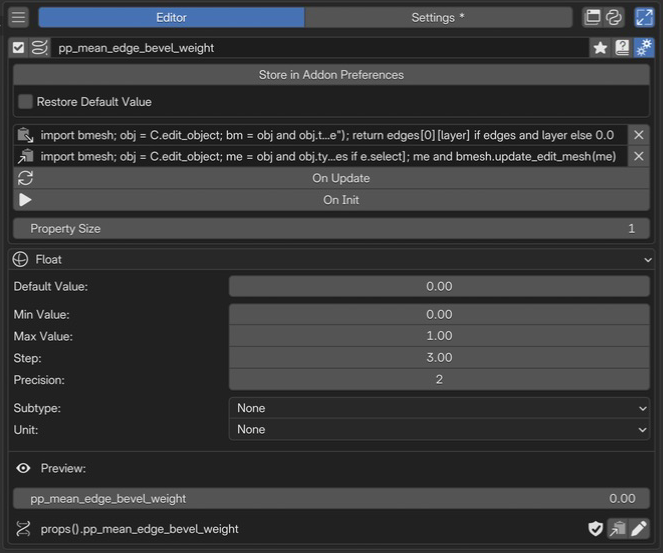 1Name and basic controlsCheck the enabled state and name, and open advanced settings.
2Advanced settingsSet the storage location, Getter / Setter code, and Property Size.
3Types and valuesChoose the type, initial value, range, and display. This example uses Float.
4Preview / Property IDCheck the current value and copy the reference path for scripts.
1Name and basic controlsCheck the enabled state and name, and open advanced settings.
2Advanced settingsSet the storage location, Getter / Setter code, and Property Size.
3Types and valuesChoose the type, initial value, range, and display. This example uses Float.
4Preview / Property IDCheck the current value and copy the reference path for scripts.
Choose a type and initial value; configure storage or Getter / Setter if needed. Finally, check the actual value and reference path in Preview.
Name and basic controls
Shared controls include enabled state, menu selection, name, tags, and advanced settings. See selected menu settings. The display name is separate from Property ID.
Create and use a property
Add Property from + in PME’s menu list.
Choose a display name and type, then set Default Value. Getter / Setter are unnecessary for simple value storage.
Edit the current value in Preview. Default Value is the initial value; Preview accesses the actual value.
Copy the reference path with Preview’s copy button. Lock the Property ID before using it in scripts to retain the same ID after renaming.
Use the copied path in another menu’s Property slot or similar destination.
For example, a Boolean named My Toggle with default storage may have the path props().my_toggle. Duplicates and other circumstances can change the actual ID, so use Preview’s path rather than guessing from the display name.
Advanced settings
Configure storage, Restore Default Value, Getter / Setter / On Update / On Init, Property Size, and related settings. Available settings vary by type. See the detailed sections below for storage and execution behavior.
Property types
Type |
Example values |
Main settings |
|---|---|---|
Boolean |
|
Default Value |
Int |
|
Default Value, Min Value, Max Value, Step, Subtype |
Float |
|
Int settings plus Precision and Unit |
String |
|
Default Value, Subtype |
Enum |
Identifiers of defined items |
Items, Default Value, Multi-Select, Expand, Horizontal Layout |
Numbers and vectors
For Boolean / Int / Float, set Property Size in advanced settings to 1–32. Size 1 is a scalar; larger sizes are vectors with that many components. A Float with Size 3, for example, has three components. String / Enum do not offer this setting.
Min Value / Max Value define the lower and upper bounds.
Step controls numeric input adjustment. For Float, it does not specify the number of decimal places displayed.
Precision sets Float display precision from 0–6.
Subtype / Unit select display and units appropriate to the value’s meaning. Choices vary by type.
For colors or directions, combine Float component count with Subtype. Increasing the component count alone does not define the value’s meaning. After changing type or Property Size, also check Default Value and the shape of values used in scripts.
Enum identifiers and display labels
Add choices with Add Slot under Items. An item name can use identifier|display label.
Item name input |
Value used in scripts |
Display |
|---|---|---|
|
|
LOW |
|
|
High Quality |
Without |, the same string is used as identifier and label. Use short, unique identifiers without spaces, such as LOW / HIGH. Do not assign display labels as values in scripts.
With Multi-Select off, the value is one identifier; with it on, a set of identifiers. Selecting both items above gives {"LOW", "HIGH"}. Expand exposes the choices as individual controls; Horizontal Layout changes their arrangement.
Property ID and migration
The display name is shown to users; Property ID is used by Python. PME 2.1 distinguishes these for both PME Property and Property Stack.
Valid IDs
Constraint |
Details |
|---|---|
Length |
1–63 characters. Only ASCII is allowed, so character and byte counts are equal |
First character |
ASCII letter |
Later characters |
ASCII letters, digits, or underscore |
Reserved names |
Python keywords such as |
Invalid examples |
|
Valid examples |
|
These are Property ID restrictions, separate from display-name or String-value rules. Display names can contain spaces and non-ASCII characters. An automatically generated ID is not necessarily a transliteration of that name.
Edit and Lock in Preview
Use Preview’s pencil button to open Edit Property ID and edit the ID and Lock state. Normally the ID follows display-name changes. Lock an ID before using it in scripts or copied paths to avoid later reference changes when renaming.
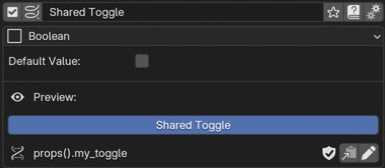
Blender 5.1.0 / PME 2.1.0-beta.6. Locking My Toggle’s ID before renaming it Shared Toggle keeps the reference path props().my_toggle. Preview is on while Default Value is off.
Lock prevents automatic ID changes; it does not prevent editing the value or display name. If you edit the ID itself, review copied paths and scripts. PME does not rewrite strings inside arbitrary Python code.
Configurations from 2.0 or earlier
During migration, an old name that is valid as an ID is automatically locked to preserve references. If spaces or other characters require a new ID, update scripts to the current path shown in Preview.
Older props("display name") examples may retain read compatibility in some cases, but cannot write by display name. New code should use the current Property ID for both reading and writing.
Value storage
Click Store in Addon Preferences in advanced settings to choose a storage type.
Storage |
Value owner |
Use |
|---|---|---|
Store in Addon Preferences |
Shared PME storage |
Share a setting across menus |
Store in Scene Instances |
Each Scene |
Keep separate values per Scene |
Store in Object Instances |
Each Object |
Keep separate values per Object |
Other types |
Each data instance of the selected type |
Choose an appropriate owner, such as Material or Mesh |
Save Blender Preferences for Addon Preferences values, or the .blend containing Scene / Object data for values owned by that data. A JSON export of menu definitions is not a backup of every Scene / Object’s current values.
With Object or similar storage, Preview’s path may point to a specific data item. Using that path edits that item. To operate on the active Object, check its existence and design target selection accordingly. Changing storage does not necessarily transfer existing values to the new owner; check values afterward.
Restore Default Value
Available only for Addon Preferences storage. When enabled, PME initialization discards the saved value and starts from Default Value. When disabled, it uses the saved value. It does not reset the value every time you use Preview.
If Preview cannot show a value
Display |
Check |
|---|---|
|
Enable the Property in the menu list |
|
Check ID restrictions and duplicates, type, and callback settings |
|
Check whether data for the selected storage exists. Registration can succeed without a suitable Preview target |
|
Check enabled state and whether the Property ID registered successfully |
An ID shown in these states is not necessarily a usable reference path.
Getter / Setter / On Update / On Init
Add callbacks in advanced settings only when reading or writing needs custom behavior. Callbacks also change how the value is stored.
Configuration |
Use |
|---|---|
No Getter / Setter |
PME stores an ordinary value. Start here for a simple custom setting |
Getter only |
Computes a value from other data; the property is read-only |
Getter and Setter |
Defines custom read and write behavior |
Setter only |
Not allowed; add a Getter first |
Getter cannot be removed while Setter exists. Remove Setter first to return to standard storage behavior.
Calls and variables
Callback |
Called when |
Specific variables / return |
|---|---|---|
Getter |
Reading the value, including UI redraw |
|
Setter |
Writing the value |
|
On Update |
Additional processing after a value update |
|
On Init |
Property initialization |
No |
In these callbacks, menu is the Property ID and pm_name is the current display name. Do not treat menu as the display name.
Example: store a Boolean yourself
This minimal example reads and writes a Boolean using data on the same owner, without changing storage. For ordinary Boolean storage, leaving callbacks unset is simpler.
Getter:
return self.get(menu, False)
Setter:
self[menu] = value
self is PME storage for Addon Preferences, or the relevant Object for Object storage. The pair above reads and writes the same key on the same owner.
With Addon Preferences storage, reading props(menu) inside Getter or calling props(menu, value) inside Setter invokes the same property again. Operate on stored data or another explicit target instead of recursively accessing the property itself. With Object / Scene storage, props() does not read or write that owner’s value either.
Return values and execution requirements
Getter must return a value matching the configured type and component count.
Type |
Getter return value |
|---|---|
Boolean / Int / Float / String |
A value compatible with |
Vector |
A sequence of Property Size components, each matching the type |
Enum |
A defined identifier or its corresponding integer value |
Multi-Select Enum |
A set of defined identifiers or the corresponding bit value |
None and unknown Enum identifiers are invalid. Getter exceptions, invalid results, or recursive reads may cause PME to return a fallback such as the default value. A displayed value alone does not prove Getter succeeded.
Getter runs repeatedly on redraw. Keep it read-only rather than creating objects, switching modes, or writing files. If it requires an Object selection or specific editor, define a fallback result. On Init does not run as a menu interaction, so do not assume an originating area exists.
Callback fields are single-line inputs. Keep logic short rather than forcing long branches or large scripts onto one line. Distinguish the return required by Getter from ordinary Command code.
Verify behavior
Standard storage: change Preview and check that referencing menus show the same value.
Stable ID: after Lock, rename the property and check that the copied path still reads the same value.
Per-owner values: create two Objects or Scenes and check that changing one does not unintentionally affect the other.
Custom callbacks: test normal operation, missing targets, and different modes. Verify Setter results at the storage location.
Save and restart: save Preferences or the
.blend, then check that values after restart agree with Restore Default Value.
When asking AI to help, specify the type, storage, Property ID, code destination, and behavior outside the intended context.
Related pages