Historical example · current compatibility unverified Original context: January 2024; PME and Blender versions were not stated.
What it shows
mcjamall07 (post #4999) asked for a more advanced PME Property example. The answer is the maintainer’s own example: Pluglug replied with a Transform Preset built mostly from PME Properties and created primarily to show how boolean properties can visually highlight the active state. It collects four parts of one Blender task:
- transform orientation;
- transform pivot point;
- snapping options;
- proportional editing.
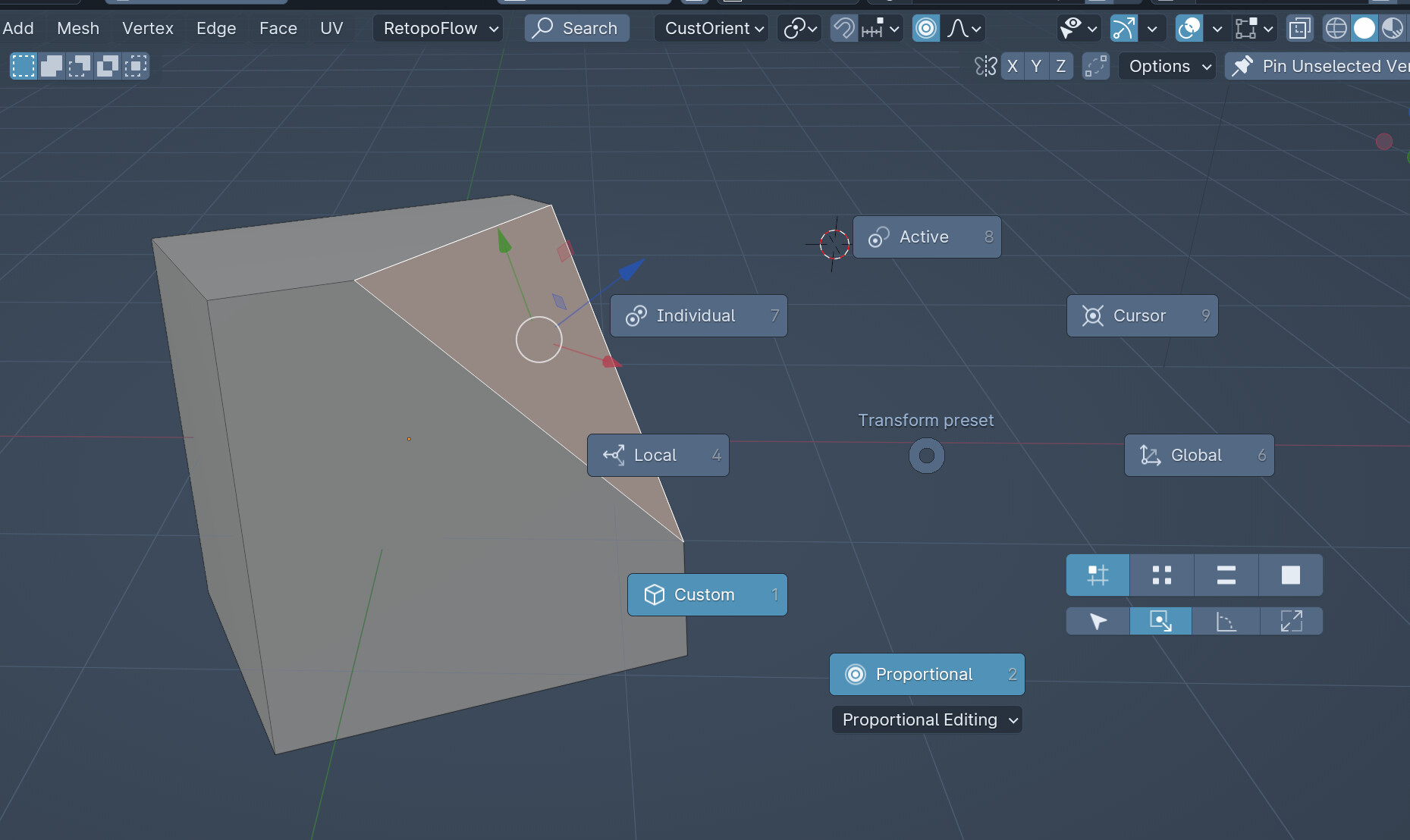
The menu mixes choices, live state, and property controls in one pie instead of a ring of command shortcuts.
Pattern to borrow
Group controls by the job, even when Blender keeps them in different panels, and show the current state where it affects the next action.
The same idea fits viewport display, sculpt settings, or selection options.
About the attached preset
The attached JSON has not been imported into PME 2.1. Test it in a copy of your Blender profile, then check its Property items, enum values, Blender identifiers, icons, and bindings against the Blender and PME versions you use.