📋 Metadata
- Author: Motiomancer
- Date: 2021-09-27 17:41:59
- Type:
answer - Reply to: post_04090
💬 Content
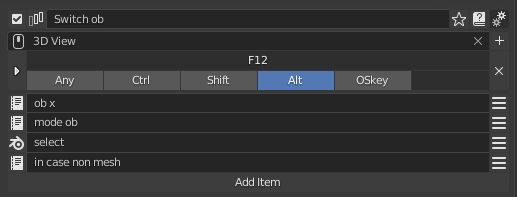
I have something like that, haven’t used it that much really so dont know how stable it is but it works by selecting what is over the mouse and changing to the same mode as long as the object is a mesh. You can use it in edit mode, vertex, sculpt, etc.
-
Saving mode and obj selected
x = C.active_object.mode; ob = C.active_object
-
Object mode
bpy.ops.object.mode_set(mode='OBJECT'); bpy.ops.transform.translate('EXEC_DEFAULT', True)
-
Selection
bpy.ops.view3d.select('INVOKE_DEFAULT', True, deselect_all=True)
-
Goes back to the last mesh and mode selected if its not a mesh (this is in case you missclick over a light, camera, etc)
ob = C.active_object if C.active_object.type == 'MESH' else ob; C.active_object.select_set(False); ob.select_set(state=True); C.view_layer.objects.active = ob; bpy.ops.object.mode_set(mode=x)
❤️ 2 likes