📋 Metadata
- Author: Motiomancer
- Date: 2021-03-28 16:50:12
- Type:
answer - Reply to: post_03807
- Replies (1): post_03809
💬 Content
Think I found a workaround.
I was trying to get different types of mask with the same keymap using shift,alt,ctrl (add/substract/smooth) and it seems adding the draw operator at the end does the trick
so:
Create Sticky Key
On press, add the mask brush from the menu
Save and Restore Previous Value
You should get this

After adding the draw operator:
value = paint_settings(C).brush; paint_settings(C).brush = D.brushes["Mask"]; bpy.ops.sculpt.brush_stroke('INVOKE_DEFAULT')
Now you can call the mask brush with alt and left mouse
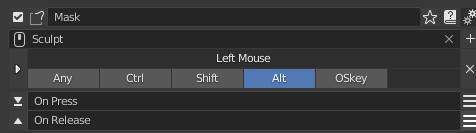
Extra Options
If you want to customize different brush settings you can add them before the operator by taking them from the info panel in scripting
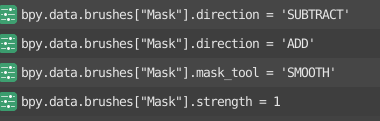
For example I want to smooth the mask at .5 strength
I will have to add
bpy.data.brushes[“Mask”].mask_tool = ‘SMOOTH’
bpy.data.brushes[“Mask”].strength = 0.5
and would look like this
value = paint_settings(C).brush; paint_settings(C).brush = D.brushes["Mask"]; bpy.data.brushes["Mask"].mask_tool = 'SMOOTH'; bpy.data.brushes["Mask"].strength = 0.5; bpy.ops.sculpt.brush_stroke('INVOKE_DEFAULT')
The only “but” from adding those it that it leaves the brush with those settings so every time I use the shortcut its going to change the brush to smooth and 0.5 strength
❤️ 1 likes