📋 Metadata
- Author: anminmakura
- Date: 2019-10-07 05:21:00
- Type:
question - Replies (1): post_02813
💬 Content
Hi roaoao.
Also, I came to listen because I was able to wonder various things in Pie Menu Editer 
There are three questions.
First, I tried to get Pie Menu Editor using right click, etc.
I’m in trouble because I can’t get the properties of the part surrounded by the red line in the system menu.
The goal of this complete system is to place properties on the Popup Dialog.
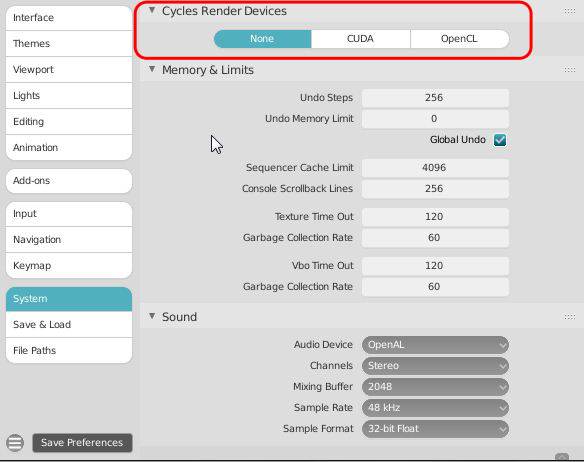
The second was to develop the first, and wanted to create a Popup Dialog that would appear when the Render Engine selected Cycles.
At present, when I make a menu that disappears, I only know to write a condition in PMItem.poll_cmd of the function of Pie Menu Editor.
Since this is the case, I have been worried before. Is there a way to switch between displaying and hiding “only one item”?
The third does not end with just placing the first property, but it is difficult to create a new property that also switches the property of C.scene.cycles.device in PROPERTIES Editor. Wow?
For example
-If the property of Cycles Render Devices is None, C.scene.cycles.device = ‘CPU’
-If the property of Cycles Render Devices is CUDA or OpenCL, C.scene.cycles.device = ‘GPU’
I would like to be able to create a new property using the Pie Menu Editer function.