📋 Metadata
- Author: jerbot
- Date: 2018-08-09 16:08:51
- Type:
bug_report - Replies (1): post_01517
💬 Content
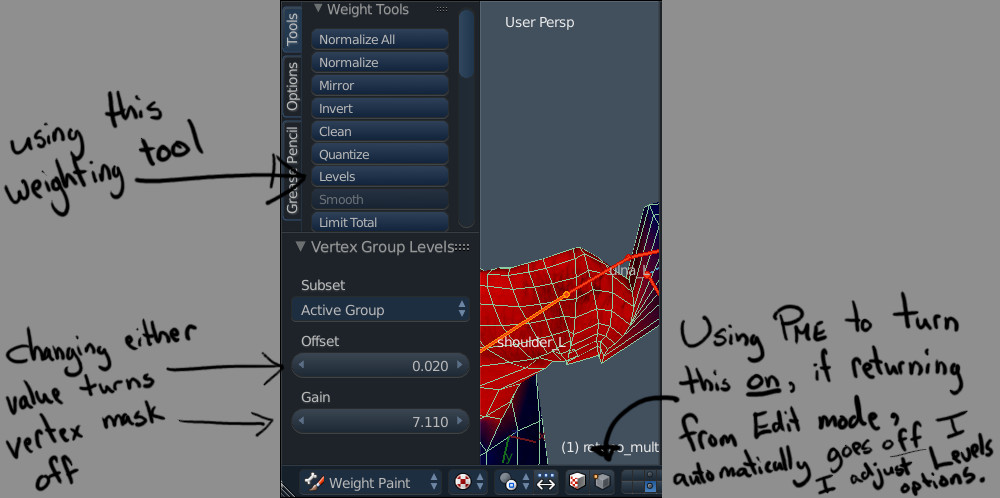 vertPaintMask1000×498 90.9 KB
First, I’ve loving this tool and am finally digging into some of the powerful features… like the modals!
However, on my first attempt at using this wonderful feature, I think I found a bug in 1.15.3 while in Weight Paint mode.
I created a pie menu item that toggles the property bpy.context.object.data.use_paint_mask_vertex
I reproduce the bug when I do the following steps:
- Disable this paint mask (toggling the button or setting property to “False” via pie menu).
- Switch to Edit mode (pressing TAB).
- Returning to Weight Paint mode by pressing TAB again.
- SO… here I turn the vertex paint mask back on using my newly created pie menu.
- Now, if I try to use the Levels tool under Tools → Weight Tools, when I adjust the values that come up in the tool options (like Offset or Gain) then Blender automatically switches the paint mask off back off. This kills it for me, as now my isolated selection is disabled and the Levels tool is effecting the entire mesh.
In step 4, if I turn the vertex paint mask back on manually using the button (not a pie menu) this doesn’t create an issue.
Curious if this can be fixed, and (for my sanity & confidence) what the reason for this wacky issue is.