📋 Metadata
- Author: bjarkirafn
- Date: 2018-04-27 15:31:03
- Type:
question - Reply to: post_01354
- Replies (1): post_01361
💬 Content
Hey!
First of all I would like to thank Roaoao for developing this game changing addon! I’m pretty much handicapped without it, since I started to dig deeper into all the possibilities it brings to the table!
PME has also given me opportunity to finally start to learn python and my first try is an quickSelection pie, that a TD made for me in my Maya days. With it, I could easily switch between objects and rigs for characters with mouse gestures(marking menu/pie menu).
So I have been melting my brain with probably the simplest code in python, to replace objects within a specific group, with an active object.
I have gone through some tutorials and the API, but for the life of me, my brain cannot seem to grasp the logic behind this?
So for example, I would like to replace the ‘Green’ cube for the ‘Red’ and ‘Blue’ cubes in group called ‘sel_N’.
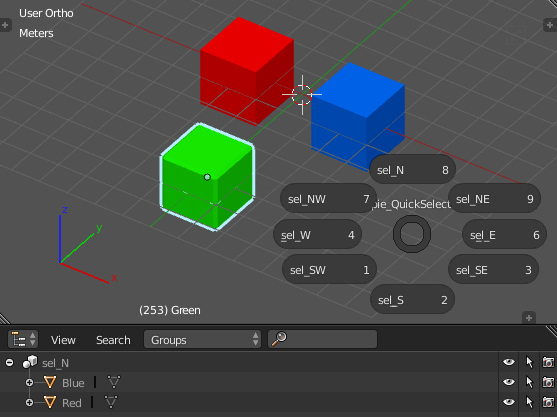
This is where I’m at, which is surely a total mumbo jumbo, but I’ve learned allot through this process. 
import bpy

to_deselect = []
selected = bpy.context.selected_objects
active = bpy.context.active_object


for ob in bpy.data.groups['sel_N'].objects:
    ob.select = True
    to_deselect.append(ob)

print(active.name)
I would really appreciate if someone here is willing to share their python wisdom to help me out with this?
Also, I was wondering if it’s possible in PME, to use the ‘PMIItem.label” in the code? So the code would use the label name as an reference for naming a ‘Group’?
Cheers!