📋 Metadata
- Author: roaoao
- Date: 2016-03-12 19:33:46
- Type:
answer - Reply to: post_00076
- Replies (1): post_00097
💬 Content
 saunam:
I couldn’t put into a pie menu or a popup menu the checkbox option “Contraint to image bounds” in the UV editor.
This add-on uses Info window to find property’s path.
But for some properties (including Constrain to Image Bounds) blender displays incorrect paths:
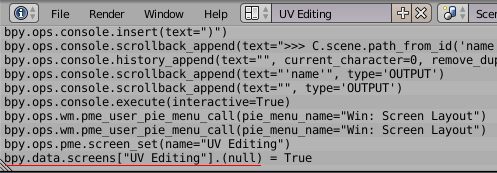
The correct path to Constrain to Image Bounds property is:
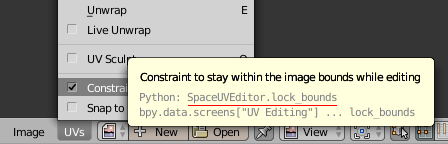
bpy.context.space_data.uv_editor.lock_bounds
You can find it in tooltips (but you have to convert it to the fullpath):
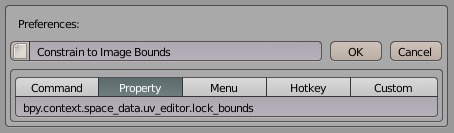
Paste the fullpath here:
saunam:
Also I would like to know if it would be possible to have a pie that would toggle between Pin and Unpin options (also in the UV editor).
Yes, it’s possible.
Make a copy of the file scripts/command_toggle.py , rename it to command_pin.py and edit :
import bpy
import sys

module = sys.modules["pie_menu_editor"]
var_name = "toggle_pin"

if hasattr(module, var_name):
    setattr(module, var_name, not getattr(module, var_name))
else:
    setattr(module, var_name, True)

if getattr(module, var_name):
    # command 1
    bpy.ops.uv.pin(clear=False)

else:
    # command 2
    bpy.ops.uv.pin(clear=True)
Now you can use that script in Command tab:
execute_script("scripts/command_pin.py")
❤️ 1 likes