Historical example · current compatibility unverified Original context: April 2025; exact Blender and PME versions were not stated.
What it shows
PME scripting often starts with one question: which Blender property am I looking at, and what values does it accept here?
Shared by Pluglug, PME’s current maintainer, as a customized build of roaoao’s Context Browser add-on. The customization added actions for copying a complete property path, a property’s current value, and a function path including its arguments. The screenshot shows the browser inspecting the active 3D View area and exposing the value-copy action beside the live property list.
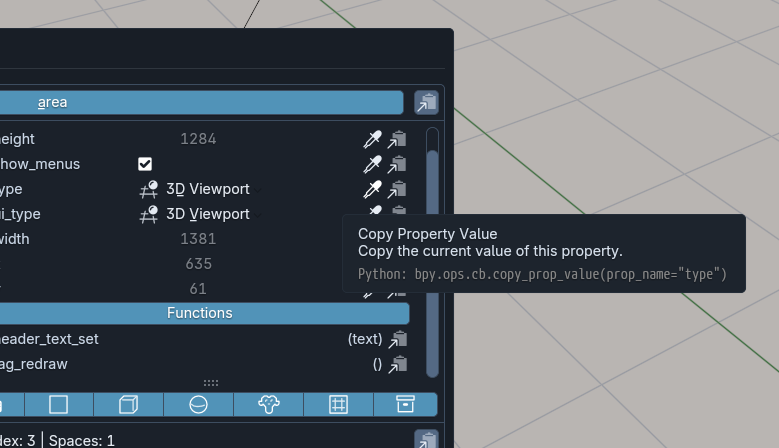
For a property such as the viewport perspective, you see the real enum values in place instead of guessing from a tooltip or searching the API reference.
Pattern to borrow
Before building a control:
- Open the editor and state where the control already works in Blender.
- Inspect that area’s live context.
- Copy the property path and note its real values.
- Build one PME Property or command around it.
- Test it in every context where the menu will appear.
About the historical replacement file
The replacement file is attached to the linked 2025 forum post. Treat it as historical installation material: the patch, Context Browser, and its interaction with PME 2.1 have not been tested here.
Check for a compatible Context Browser release first. A copied path can still depend on the area, mode, active object, or data-block it was read from.
Media and linked tool
- Open the original Context Browser screenshot
- Read the Context Browser customization post
- Open the Context Browser product page linked by the source post